Create 3D Content Online with Paint 3D
Paint 3D turns any image into a detailed 3D model. Upload a photo, generate in seconds, download a GLB file ready for games, 3D printing, or product visualization.
Free. No signup. No install.
Paint 3D — Image to 3D Generator
Upload an image, generate a 3D model, download the GLB file. First generation may take 30 to 60 seconds while the GPU warms up.
Paint 3D is loading — first generation may take 30 to 60 seconds while the GPU warms up...
See What Paint 3D Can Create
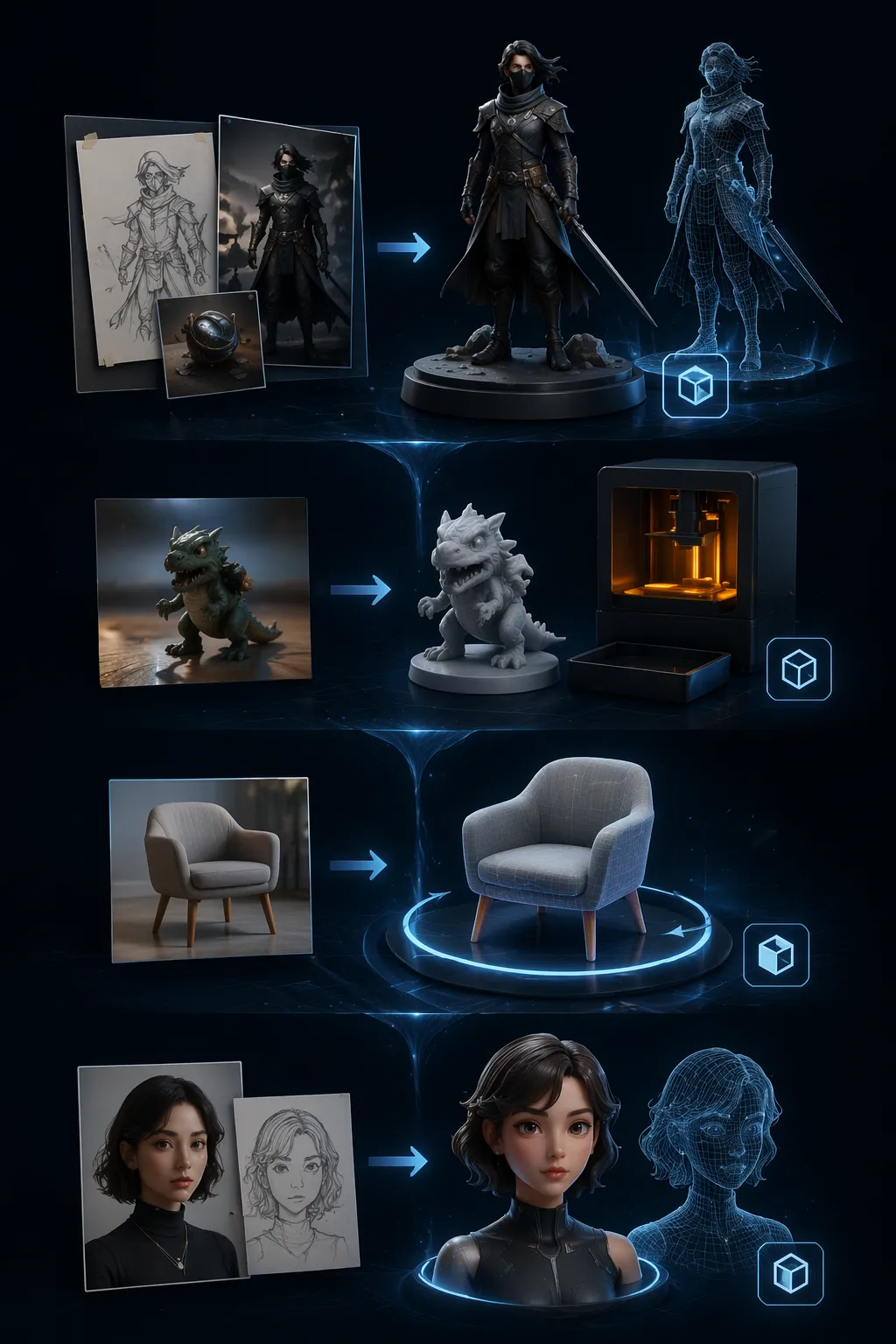
Paint 3D reads the shape, color, and texture of any image and builds a full 3D model from it. One photo in — a GLB file out, ready to drop into your game, printer, or store.
- Game-Ready 3D AssetsConcept art, character sketches, prop photos — upload one and drop the generated model into Unity, Unreal, or Blender.
- 3D Printing ReferencesPhotograph a figurine, a toy, or a product — upload it and get a printable GLB in seconds. Clean base mesh, ready for slicer software.
- Product VisualizationTurn a product photo into a 360° rotatable 3D model. Perfect for ecommerce listings, AR previews, and marketing pages.
- Avatars & CharactersDrop in a portrait, a sketch, or a character render — get a rig-ready 3D model for VTubing, metaverse, or gaming.
Why Choose Paint 3D
Three reasons Paint 3D beats desktop 3D software and paid services:

How Paint 3D Works in 3 Steps
Paint 3D turns an image into a 3D model in under a minute. The flow, start to finish:
Upload an Image
Drag a photo in or click to pick one. JPG, PNG, WebP — clear subjects with a plain background work best.
Generate the 3D Model
Click Generate. The AI reads your image and builds a mesh with textures in seconds. Pick resolution 512, 1024, or 1536.
Download the GLB File
Click Extract GLB. Open it in Blender, Unity, Unreal, or your favorite 3D printing slicer. Use it anywhere GLB is supported.
Paint 3D Features
Six capabilities that make Paint 3D the fastest way to turn images into 3D online:
Image-to-3D AI
Paint 3D reads your photo and builds a full 3D mesh with textures. No modeling skill needed — the AI handles geometry and materials.
GLB File Export
Download the industry-standard GLB format. Works in Blender, Unity, Unreal, Three.js, 3D printers, and AR viewers.
Fast Generation
Standard resolution finishes in about 3 seconds. High-detail models (1024³) in around 17 seconds. No queue for most users.
Choose Your Resolution
Pick 512 for speed, 1024 for balance, or 1536 for maximum detail — mesh quality scales to what you need.
No Signup, No Limits
No account required. No daily cap, no monthly limit, no usage counter. Generate 1 model or 100 — the price stays zero.
Desktop, Tablet, Mobile
Runs on any screen. Generation happens on our servers, so your phone or tablet never breaks a sweat.
Paint 3D by the Numbers
Real-world stats:
3-60s Per 3D Model
Per 3D Model
GLB Industry Format
Industry Format
100% Free Forever
Free Forever
Real Creations with Paint 3D


Frequently Asked Questions
Quick answers about Paint 3D — what it does, what it costs, and how your images are handled.
Ready to Turn Your Image into 3D?
Paint 3D is free forever — no signup, no install. Upload your first image and get a 3D model in under a minute.